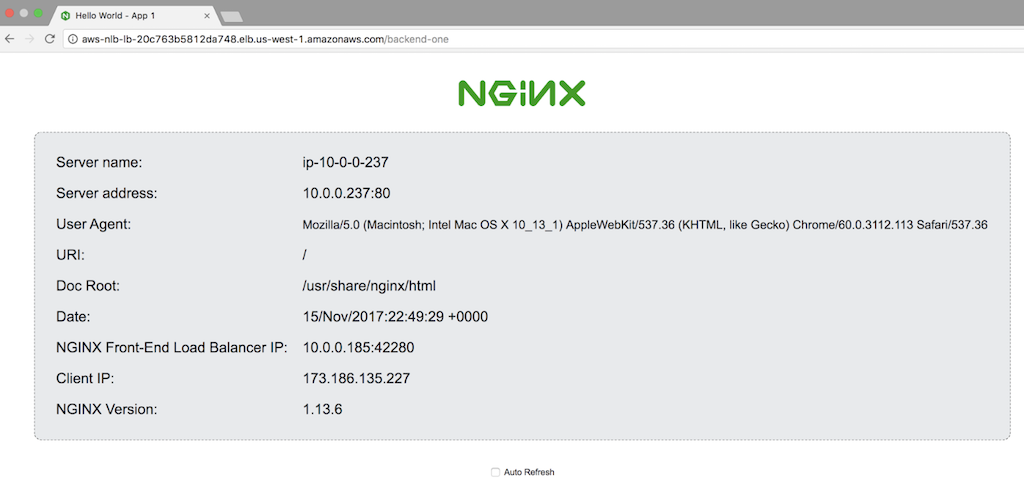
 If you are using these instructions to satisfy the prerequisites for one of our deployment guides, the Appendix in the guide specifies the name of each NGINX Open Source instance and whether to configure **App 1** or **App 2**.
**Note:** Some commands require `root` privilege. If appropriate for your environment, prefix commands with the `sudo` command.
1. Open a connection to the NGINX Open Source instance and change the directory to **/**etc/nginx/conf.d**:
```shell
cd /etc/nginx/conf.d
```
2. Rename **default.conf** to **default.conf.bak** so that NGINX Plus does not use it.
```shell
mv default.conf default.conf.bak
```
3. Create a new file called **app.conf** with the following contents.
```nginx
server {
listen 80 default_server;
server_name app_server;
root /usr/share/nginx/html;
error_log /var/log/nginx/app-server-error.log notice;
index demo-index.html index.html;
expires -1;
sub_filter_once off;
sub_filter 'server_hostname' '$hostname';
sub_filter 'server_address' '$server_addr:$server_port';
sub_filter 'server_url' '$request_uri';
sub_filter 'remote_addr' '$remote_addr:$remote_port';
sub_filter 'server_date' '$time_local';
sub_filter 'client_browser' '$http_user_agent';
sub_filter 'request_id' '$request_id';
sub_filter 'nginx_version' '$nginx_version';
sub_filter 'document_root' '$document_root';
sub_filter 'proxied_for_ip' '$http_x_forwarded_for';
}
```
Directive documentation: [error_log](http://nginx.org/en/docs/ngx_core_module.html#error_log), [expires](http://nginx.org/en/docs/http/ngx_http_headers_module.html#expires), [index](http://nginx.org/en/docs/http/ngx_http_index_module.html#index), [listen](http://nginx.org/en/docs/http/ngx_http_core_module.html#listen), [root](http://nginx.org/en/docs/http/ngx_http_core_module.html#root), [server](http://nginx.org/en/docs/http/ngx_http_core_module.html#server), [server_name](http://nginx.org/en/docs/http/ngx_http_core_module.html#server_name), [sub_filter](http://nginx.org/en/docs/http/ngx_http_sub_module.html#sub_filter)
4. Include the following directive in the top‑level ("main") context in **/etc/nginx/nginx.conf**, if it does not already appear there.
```nginx
include conf.d/*.conf;
```
Directive documentation: [include](http://nginx.org/en/docs/ngx_core_module.html#include)
5. In the **/usr/share/nginx/html** directory, create a new file called **demo-index.html** with the following contents, which define the default web page that appears when users access the instance.
In the `
If you are using these instructions to satisfy the prerequisites for one of our deployment guides, the Appendix in the guide specifies the name of each NGINX Open Source instance and whether to configure **App 1** or **App 2**.
**Note:** Some commands require `root` privilege. If appropriate for your environment, prefix commands with the `sudo` command.
1. Open a connection to the NGINX Open Source instance and change the directory to **/**etc/nginx/conf.d**:
```shell
cd /etc/nginx/conf.d
```
2. Rename **default.conf** to **default.conf.bak** so that NGINX Plus does not use it.
```shell
mv default.conf default.conf.bak
```
3. Create a new file called **app.conf** with the following contents.
```nginx
server {
listen 80 default_server;
server_name app_server;
root /usr/share/nginx/html;
error_log /var/log/nginx/app-server-error.log notice;
index demo-index.html index.html;
expires -1;
sub_filter_once off;
sub_filter 'server_hostname' '$hostname';
sub_filter 'server_address' '$server_addr:$server_port';
sub_filter 'server_url' '$request_uri';
sub_filter 'remote_addr' '$remote_addr:$remote_port';
sub_filter 'server_date' '$time_local';
sub_filter 'client_browser' '$http_user_agent';
sub_filter 'request_id' '$request_id';
sub_filter 'nginx_version' '$nginx_version';
sub_filter 'document_root' '$document_root';
sub_filter 'proxied_for_ip' '$http_x_forwarded_for';
}
```
Directive documentation: [error_log](http://nginx.org/en/docs/ngx_core_module.html#error_log), [expires](http://nginx.org/en/docs/http/ngx_http_headers_module.html#expires), [index](http://nginx.org/en/docs/http/ngx_http_index_module.html#index), [listen](http://nginx.org/en/docs/http/ngx_http_core_module.html#listen), [root](http://nginx.org/en/docs/http/ngx_http_core_module.html#root), [server](http://nginx.org/en/docs/http/ngx_http_core_module.html#server), [server_name](http://nginx.org/en/docs/http/ngx_http_core_module.html#server_name), [sub_filter](http://nginx.org/en/docs/http/ngx_http_sub_module.html#sub_filter)
4. Include the following directive in the top‑level ("main") context in **/etc/nginx/nginx.conf**, if it does not already appear there.
```nginx
include conf.d/*.conf;
```
Directive documentation: [include](http://nginx.org/en/docs/ngx_core_module.html#include)
5. In the **/usr/share/nginx/html** directory, create a new file called **demo-index.html** with the following contents, which define the default web page that appears when users access the instance.
In the `
Server name: server_hostname
Server address: server_address
User Agent: client_browser
URI: server_url
Doc Root: document_root
Date: server_date
NGINX Frontend Load Balancer IP: remote_addr
Client IP: proxied_for_ip
NGINX Version: nginx_version