
Overview and architecture
NGINXaaS for Google Cloud is a service offering that is tightly integrated into Google Cloud platform and its ecosystem, making applications fast, efficient, and reliable with full lifecycle management of advanced NGINX traffic services.
NGINX Plus powers NGINXaaS for Google Cloud, which extends NGINX Open Source with advanced functionality and provides customers with a complete application delivery solution.
NGINXaaS handles the NGINX Plus license management automatically.
The key capabilities of NGINXaaS for Google Cloud are:
- Simplifies onboarding by providing a fully managed, ready-to-use NGINX service, eliminating the need for infrastructure setup, manual upgrades, or operational overhead.
- Lowers operational overhead in running and optimizing NGINX.
- Simplifies NGINX deployments with fewer moving parts (edge routing is built into the service).
- Supports migration of existing NGINX configurations to the cloud with minimal effort.
- Integrates with the Google Cloud ecosystem.
- Adopts a consumption-based pricing to align infrastructure costs to actual usage by billing transactions using Google.
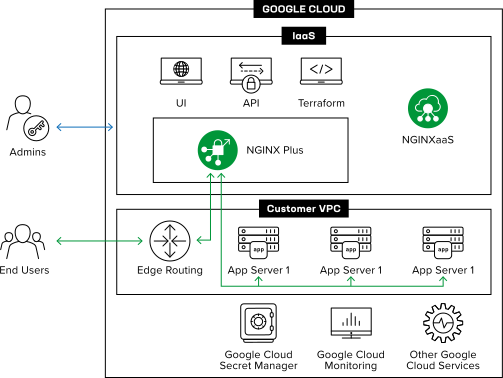
- The NGINXaaS Console is used to create, update, and delete NGINX configurations, certificates and NGINXaaS deployments
- NGINXaaS automatically adapts to application traffic demands through autoscaling
- Each NGINXaaS deployment has dedicated network and compute resources. There is no possibility of noisy neighbor problems or data leakage between deployments
- NGINXaaS can route traffic to upstreams even if the upstream servers are located in different geographies. See Known Issues for any networking restrictions.
- NGINXaaS supports request tracing. See the Application Performance Management with NGINX Variables blog to learn more about tracing.
- Supports HTTP to HTTPS, HTTPS to HTTP, and HTTP to HTTP redirects. NGINXaaS also provides the ability to create new rules for redirecting. See How to Create NGINX Rewrite Rules | NGINX for more details.
The service frontend of an NGINXaaS deployment controls how client ingress traffic reaches your deployment. There are two frontend types: managed public endpoint and private endpoint.
A managed public endpoint frontend allows client access over the internet through a public DNS name created by NGINXaaS in its network.
This frontend type is suitable for:
- Serving public web applications to end users over the internet
- Proxying traffic from clients outside Google Cloud
- Testing NGINXaaS configurations before you set up a Private Endpoint frontend
Access control
Access control list (ACL) rules control traffic to a managed public endpoint deployment. If you don’t provide ACL rules, no traffic is allowed. An ACL rule includes the following settings:
- Source prefixes: A list of CIDR blocks to allow traffic from
- Use
0.0.0.0/0to allow traffic from all source IP addresses
- Use
- Protocol: The network protocol to allow
- Valid values are TCP and UDP
- Required when you specify a port range
- Port range: A single port or port range to allow traffic from
- If you don’t specify a port range, traffic is allowed from any port
- Required when you specify a protocol
A private endpoint frontend allows client access through your network by using Google’s Private Service Connect (PSC). To set up connectivity, create either a PSC endpoint for internal traffic or a PSC backend for external traffic. This approach brings the NGINXaaS deployment into your client network through an NGINXaaS-created service attachment, so application clients can connect directly into your network. For step-by-step instructions, see Set up connectivity.
This frontend type is suitable for:
- Situations where you need greater control over traffic to the NGINXaaS deployment
- Environments where all clients exist within your Google Cloud network
- Internal services that shouldn’t be exposed to the internet
Access control
A service attachment accept list restricts which Google project IDs can connect to the deployment. If you don’t specify any project IDs in the accept list, traffic from all projects is allowed.
NGINXaaS uses Google Private Service Connect (PSC) to connect securely to your applications.
A PSC interface brings the deployment into your application network and supports secure connectivity to your applications. By using your own networking resources, you control traffic flow and can apply your preferred security controls.
To connect the NGINXaaS PSC interface to your network, you must create a network attachment. For steps, see https://frontdoor-test-docs.nginx.com/previews/docs/1856/nginxaas/google/getting-started/create-deployment/deploy-console/#create-a-network-attachment.
During scaling, some connections older than 60 seconds might be reset. The service automatically handles reconnects, so you don’t need to wait before reconnecting.
An NGINX Capacity Unit (NCU) quantifies the capacity of an NGINX deployment based on its underlying compute resources. This abstraction lets you specify capacity in NCUs without considering hardware differences between regions. You can reserve a minimum capacity for your deployment. The deployment automatically scales up or down based on traffic demand and makes sure it never drops below the reserved minimum.
NGINXaaS for Google has a global presence, with management requests served by regional controllers. A geographical controller (GC) is a control plane that serves users within a defined geographic boundary while addressing data residency and localization requirements. For example, a US geographical controller serves customers in the United States. NGINXaaS currently operates in three geographies: US, EU, and Asia Pacific (APAC).
NGINXaaS for Google Cloud is supported in the following regions per geography:
| NGINXaaS Geography | Google Cloud Regions |
|---|---|
| US | us-east1, us-east4, us-west1, us-west2, us-west3, us-west4, us-central1 |
| EU | europe-west1, europe-west2, europe-west3, europe-west4, europe-north1, europe-central2 |
| APAC | asia-southeast1, asia-south1, asia-south2 |
We are committed to enhancing NGINXaaS for Google Cloud and welcome your feedback to help shape the future of our service. If there are features you’d like to see prioritized, we encourage you to submit a support ticket to share your suggestions.
Here are the current constraints you should be aware of when while using NGINXaaS for Google Cloud:
- NGINXaaS is supported in a limited number of regions. We are continually working to expand support across additional regions.
- We only support authentication via Google acting as an identity provider.
- User Role-Based Access Control (RBAC) is not yet supported, but this enhancement is on our roadmap as we improve access control for multi-user environments.
To get started, check the NGINXaaS for Google Cloud prerequisites