
Support
To contact support about F5 NGINXaaS for Azure (NGINXaaS):
-
Go to your NGINXaaS deployment. In the left menu, select Help, then select New support request > Raise a support ticket. You will be redirected to MyF5 to create a new case. Alternatively, you can directly go to the MyF5 portal and log in with your F5 account.
-
Go to the Support section and select Create a Case.
-
Fill in the Subject and Description fields to describe the issue, and then select Next.
Make sure the Description field is completed with the relevant information about your issue, bug report, or feedback.
If you are contacting us to report an issue, please include the following information so that the support team can begin their investigation:
- Location
- Resource ID
- Date and time of the issue
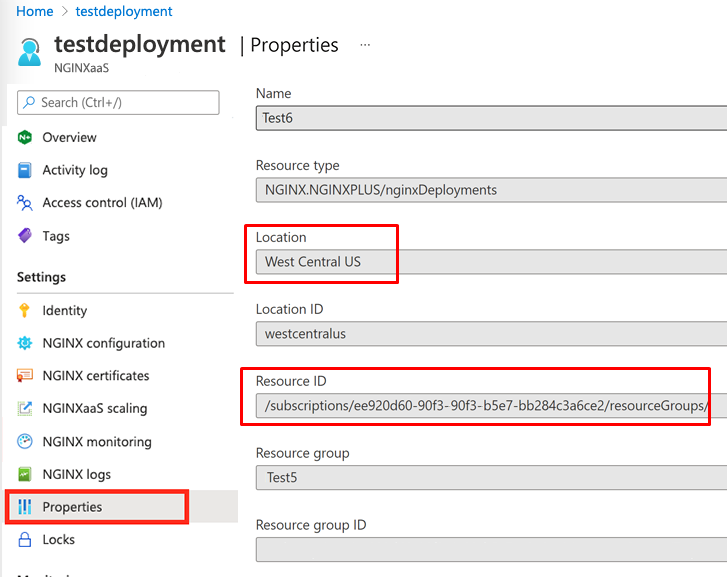
The Location and Resource ID values are available in the Properties section of your deployment:
If your deployment is configured to use F5 WAF for NGINX, please also collect the following information:
- Package versions from the F5 WAF for NGINX page
- Security policies in use and the content of all custom security policies
-
Select NGINX Products as the product family and NGINXaaS as the product module, and then select Next.
-
Enter the following required fields, at a minimum, and then select Next:
- Reason for contact
- Subscription ID (Select No subscription available or your F5 subscription ID if you have a private offer.)
- Cloud Provider
- Assign a priority
-
Complete the fields in the Contact Information section for your case and then select Submit.
To provide or update the preferred support contact email:
-
Go to your NGINXaaS for Azure deployment.
-
Select New Support request in the left menu.
-
Select the Edit button next to the Support Contact Email field.
-
Provide a new email address in the field and select Submit.